Picture and sound together
Voices, footsteps and room sound come out of the same pass as the image, so you get a finished clip, not a silent one.
Happy Horse · by Alibaba
Happy Horse (HappyHorse) is Alibaba's closed video model. It makes picture and sound together in one pass, so characters speak their lines with matching lips, and it ranked at the top of blind-vote video arenas when it launched in April 2026. It also edits an existing clip from a written instruction. Write a shot below and it opens in Video Studio on Happy Horse.
Example video
Opens in Video Studio with the model you picked. You see the price in credits before anything runs.
Voices, footsteps and room sound come out of the same pass as the image, so you get a finished clip, not a silent one.
Put dialogue in quotes and the speaker says it; reviewers rate its lip sync well above average, in seven languages.
Dance, sport and everyday gestures read as real, with steady camera moves.
Video Edit restyles footage you already have (season, wardrobe, setting) while keeping the person and the movement.
Every clip below was generated with the prompt shown, unedited (an edit shows its original in the corner). Load any prompt into the generator and make your own version.
Vertical phone video at a small café table by the window: two women in their twenties share a pastry. One leans in and says, "he really thought it was a costume party." Her friend bursts out laughing and covers her mouth. Warm afternoon light, natural skin texture. Sound: their voices, cups clinking, soft café chatter.
Vertical get-ready-with-me video: a creator in her twenties with curly hair sits at a mirror, finishes her mascara, blinks, then turns to the phone camera and says, "okay, last step, then we go." Ring-light glow, bedroom background. Sound: her voice, a makeup bag zipper, quiet room tone.
Vertical phone video in a tiled subway station: a breakdancer in his twenties with a red headband spins on his back, kicks up into a one-hand freeze and holds it while a small crowd cheers and claps. Fluorescent light, commuters walking past. Sound: the cheer, sneaker squeaks, a distant train arriving.
Vertical close shot on a stone harbour at dawn: an old fisherman with a white beard and a wool cap mends a net with weathered hands, then looks up into the camera and says quietly, "the sea decides, not me." Gulls, gentle waves, soft blue morning light. Sound: his voice, gulls, water lapping on stone.
Vertical tracking shot: a teenage girl with a long braid and an oversized t-shirt skateboards down a sunny residential hill toward the camera, crouching low, arms out for balance, grinning. The camera rolls backward ahead of her. Sound: wheels rumbling on asphalt, wind, her laugh.
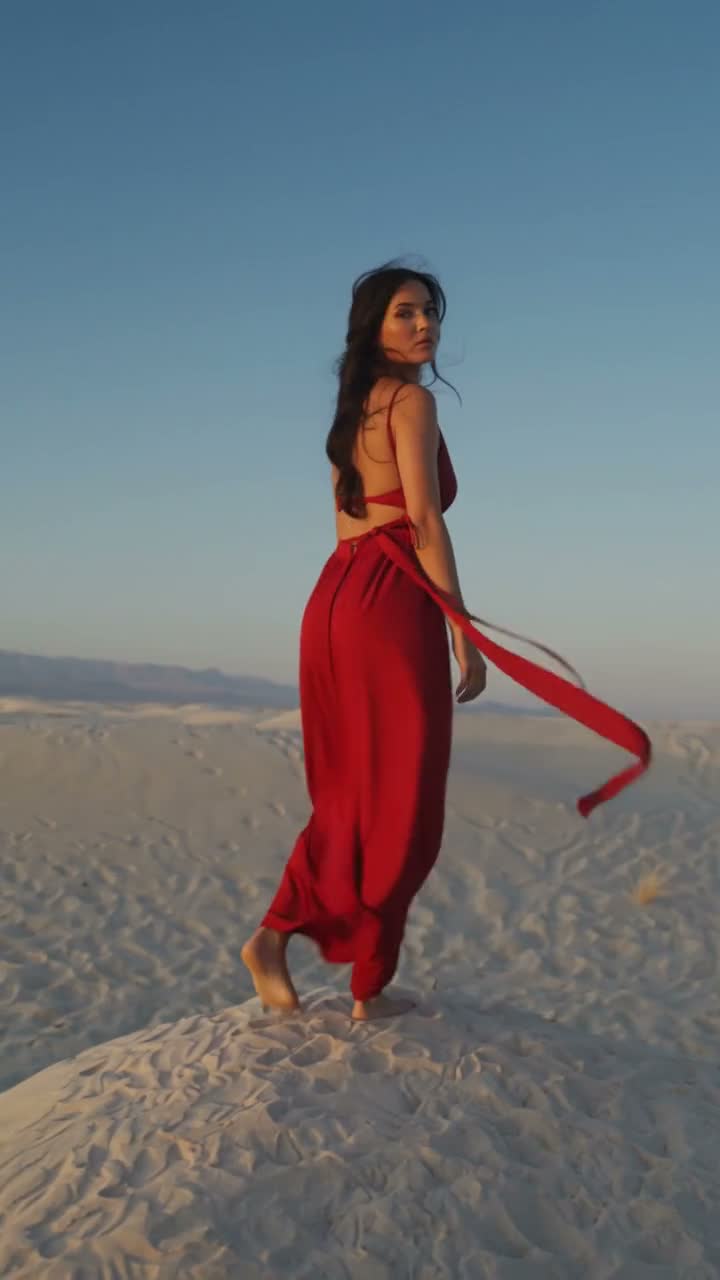 Original
Change the scene to a snowy night: the white dune becomes deep fresh snow under a dark blue sky with falling snowflakes, and her crimson dress becomes a deep emerald green velvet dress. Keep the model, her pose, the turn and the wind on the fabric the same.
Wide shot at a night market food stall: a street cook in his fifties tosses noodles high in a flaming wok, catches them and slides them onto a plate for a waiting customer, who grins. Steam, string lights, crowd behind. Sound: the roar of the burner, sizzling, crowd chatter, the cook calling out an order.
Start here
Dialogue scenes and UGC-style clips with sound
From text or a start photo. The studio's Happy Horse rows run version 1.0.
5 s clip 254 credits · 5–15 s
Open with Happy Horse 1.0Option 2
Keeping a character or product the same
Version 1.1, guided by up to 9 reference images: a face, an outfit, a product.
Not switched on right now
Option 3
Restyling footage you already have
Change the setting, season or wardrobe of a clip with a written instruction; the output is up to 15 seconds.
508 credits a run
Open with HappyHorse Video EditAlibaba's open Wan models are a separate line from a different team; see the Wan page. Credits are read from the live catalog; the Standard plan ($24/month) includes 2,000 credits, about 7 five-second Happy Horse 1.0 clips.
Write it in the box at the top of this page, or start from an example. Add a photo to use it as the first frame.
Your prompt, photo and format carry over with Happy Horse selected. Nothing runs until you press Generate.
Choose 5, 10 or 15 seconds. The credit price shows under the Generate button before anything is spent.
Restyle the result with Video Edit, add a voiceover in Audio Studio, or cut it together in the Video Editor.
Alibaba's closed AI video model (also written HappyHorse). It makes video and sound in one pass, including dialogue with matching lips, and edits existing clips from a written instruction.
No. Both are from Alibaba, but Happy Horse comes from its Token Hub unit and is closed, while Wan comes from Tongyi Lab and has open weights.
Text and photo clips run HappyHorse 1.0; Reference to Video runs 1.1; Video Edit runs Alibaba's edit model, which has no 1.1 yet.
No, Happy Horse always generates audio. Ask for the sounds you want in the prompt, or replace the track in the Video Editor.
No. Every run costs credits, shown before you generate. Credits come with a monthly plan and unused credits roll over up to the plan's cap.
Yes, on paid Affogato plans, subject to our terms of service and the model provider's terms (Alibaba). You need the rights to anything you upload, such as photos, faces, voices or brand assets. Read our terms of service.
Facts checked November 15, 2026. Sources: fal: HappyHorse · fal: HappyHorse 1.0 review · fal: How to use HappyHorse 1.1 · TechNode: HappyHorse 1.1 launch · howaiworks: HappyHorse · fal: Video Edit API