STUDIO · PRODUCTAFFOGATO STUDIOS

One product. A whole campaign.

The Product Studio turns a single product photo into a set of ad creatives. Pick a scene — clean studio, golden hour, water splash, marble minimal — pick the placements you need, add a brief with your offer, and get exact-size photos and short product films for every platform in one batch.

16 SCENES · 20+ AD PLACEMENTS · PHOTOS + FILMS · UP TO 24 PER BATCH

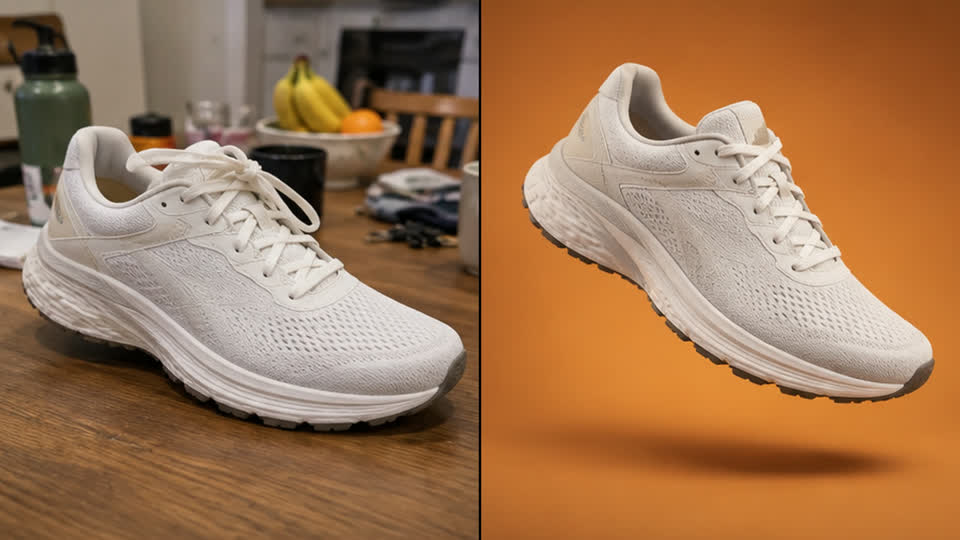
A white sneaker photographed on a desk, then in a clean orange studio scene
MADE IN PRODUCT STUDIO
01EXAMPLES

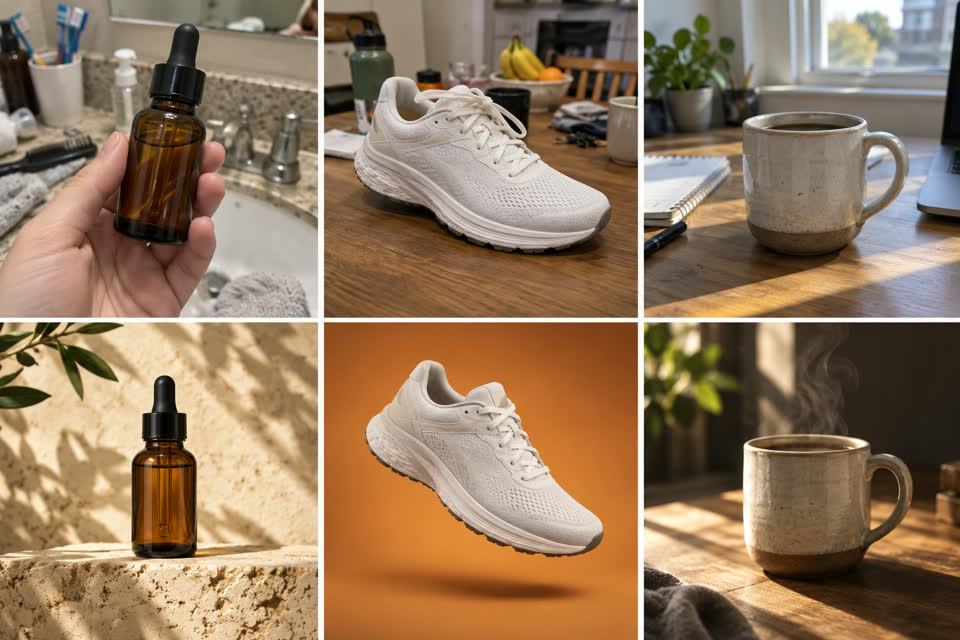
Pick a mood. Make it yours.

02WHAT YOU GET

Built for the job, not a generic prompt box.

16 scene templates

Clean studio, Stone pedestal, Golden hour, Water splash, Botanical, Color pop, Bathroom shelf, Midnight gloss, Floating forms, Ingredient story, Desk essentials, Sand & sun, Gift edit, Fresh drop, Marble minimal, Weekend ritual — each as photo or film.

Every placement, exact size

Facebook and Instagram feed, portrait and Stories/Reels; TikTok; Google display and Demand Gen; YouTube in-stream; Pinterest pins; LinkedIn — exported at the platform's pixel size.

Product films

5 or 10 second clips structured as reveal, detail and hero finish, with your product held as the reference.

Your copy, verbatim

Offers, slogans and CTAs in the brief are passed through as ad copy, not paraphrased.

Batches, not one-offs

Up to 24 creatives per run — scenes × placements × up to four variations — with one estimate for the lot.

Routed to the best engine

Photos on Seedream v5 Pro Edit with a Wan 2.7 fallback; films on Seedance 2.0 reference-to-video.

03HOW IT WORKS

How to make AI product photos and videos for ads, in three steps.

  1. 01

    Upload the product

    One JPG, PNG or WebP of the product — a phone snap on your desk is enough. Add a brief with the offer, slogan or CTA you want on the creative.

  2. 02

    Choose scenes and placements

    Pick a scene template (or several), photo or film, and the placements you need across Facebook, Instagram, TikTok, Google, YouTube, Pinterest and LinkedIn. Set 1–4 variations.

  3. 03

    Generate the campaign

    Up to 24 creatives land in your batch: exact-size JPGs and H.264 MP4s, ready to upload to each ad platform.

INPUT 1 PRODUCT PHOTOSCENES 16 × PHOTO / FILMPLACEMENTS FB · IG · TIKTOK · GOOGLE · YT · PINTEREST · LINKEDINVIDEO 5 / 10 S · 3 SCENESBATCH UP TO 24 CREATIVES
04EXPLAINED

How does AI product photography work?

AI product photography takes a photo of your product and re-renders it inside a new scene — studio, lifestyle, seasonal — while keeping the product itself accurate: its shape, label, colour and finish. The best current editing models (Seedream v5, Wan 2.7) do this with a reference image and a scene description, and reference-to-video models (Seedance 2.0) can then move the camera around it.

The Product Studio wraps that in an ad workflow. Sixteen scene templates give you the mood in one click; a placement list gives you the exact pixel sizes each ad platform wants; a brief carries your offer and CTA into the creative verbatim; and a product film is structured the way performance ads are — a reveal, a detail pass, a hero finish. A batch of up to 24 creatives comes out sized and named for upload.

It's the fastest route from the product on your desk to a live campaign, and it lives next to the tools that finish it: cut-outs, upscaling and the Video Editor.
05USE CASES

What people make with it.

Launch campaigns

One photo in, a full set of feed, story and display creatives out.

Promo creatives

"50% off this weekend" carried verbatim onto every placement.

Seasonal refresh

Gift edit for the holidays, Sand & sun for summer — same product, new scene.

Product films for Reels and TikTok

A 10 second reveal-detail-hero clip without a video crew.

Marketplace and PDP imagery

Clean studio and pedestal scenes for listings.

06FAQ

Questions, answered.

What product photo do I need?

One clear photo — JPG, PNG or WebP — of the product. A phone photo on a desk works; a plain background helps. The product's shape, label and colour are preserved in every scene.

Which ad sizes are supported?

Facebook and Instagram square, portrait and Stories/Reels; TikTok vertical, square and landscape; Google responsive and square display and Demand Gen portrait and vertical; YouTube in-stream 1920×1080; Pinterest 1000×1500; LinkedIn 1200×628 and 1200×1200.

Does it make video?

Yes. Any scene can be generated as a 5 or 10 second product film with three beats — reveal, detail, hero finish — exported as H.264/AAC MP4.

Can I put my offer text on the creative?

Yes. Offers, slogans and CTAs in your brief are passed through as ad copy exactly as written.

How many creatives per run?

Up to 24: scenes × placements × up to four variations, with a single credit estimate before you generate.

How is it priced?

Per photo and per second of film in credits; the estimate covers the whole batch and shows before you generate. Plans start at $24/month with rollover and a commercial license.

From your desk
to their feed.

Sign in, upload one product photo, and generate your first set of ad creatives.

NO WATERMARKS · CREDITS ROLL OVER · COMMERCIAL LICENSE INCLUDED · CANCEL ANYTIME