Text in many languages
Seedream 5.0 Pro renders text in more than ten languages, right-to-left included. Our Dubai menu board mixed Arabic and English correctly.
Seedream 5 · by ByteDance
Seedream 5 is ByteDance's 2026 image line: 5.0 Lite, Flash and Pro, and Seedream 5.5, released in November. It is known for text in many languages, including right-to-left scripts, dense poster layouts, and edits that keep the same person. Describe an image below, or add a photo to edit, and it opens in Image Studio on Seedream 5.5.

Example image
Opens in Image Studio with the model you picked. You see the price in credits before anything runs.
Seedream 5.0 Pro renders text in more than ten languages, right-to-left included. Our Dubai menu board mixed Arabic and English correctly.
ByteDance built 5.0 Pro for structured design. Seedream 5.5 laid out a full carnival poster, date line and footer in Portuguese.
Seedream 5.5 Edit moved a girl from a mirror selfie to an autumn street in Paris and kept her face, hair, jeans and t-shirt.
Flash is the fast, cheap tier; Lite adds web search and bigger files; Pro is the design flagship; 5.5 is the newest all-rounder.
Every image below was generated with the prompt shown, unedited (an edit shows its original in the corner). Load any prompt into the generator and make your own version.
Creator realismVertical phone photo of a beauty creator in her twenties with glossy black hair in a claw clip, filming her morning skincare routine in a bright bathroom, holding a small dropper bottle up to the phone on a ring light, mid-sentence and smiling. Natural skin with visible pores, soft daylight from a frosted window.
 Arabic and English
Candid vertical photo of a café owner in her thirties in Dubai wearing a sand-coloured hijab and a denim apron, smiling as she holds up a small chalkboard menu at her counter. The board reads "قهوة عربية" on the first line and "Arabic coffee 18 AED" on the second, and "كرك" then "Karak 12 AED" below. Brass dallah coffee pots, morning light, natural skin texture.
 Posters in Portuguese
Vertical carnival poster for a street party in Rio: a samba dancer in her twenties in a gold-feathered costume mid-spin, confetti in the air, crowd behind her. Bold headline at the top: "BLOCO DA LUA". Below it: "Sábado 14 de fevereiro · 16h · Lapa". Small footer: "Entrada gratuita". Vibrant, modern festival typography, real photograph of the dancer.
 Same girl, new city
 Original
Keep the exact same woman from image 1: same face, hair, jeans and white t-shirt. Now she is walking along a Paris street in autumn wearing a long camel wool coat over the same outfit, holding a coffee, leaves on the pavement, soft morning light. Vertical photo.
 Fast and candid
Candid vertical photo of wedding guests dancing at a backyard reception at night: an older man in a loosened tie spinning his laughing granddaughter, string lights overhead, other guests clapping behind them, slight motion blur, warm light, real photograph.
 Big files
Vertical street portrait of a tram driver in Lisbon in his fifties with a grey moustache and a navy cap, leaning out of the window of a yellow tram on a steep cobbled street, waving at the camera, afternoon sun, natural skin texture, real photograph.
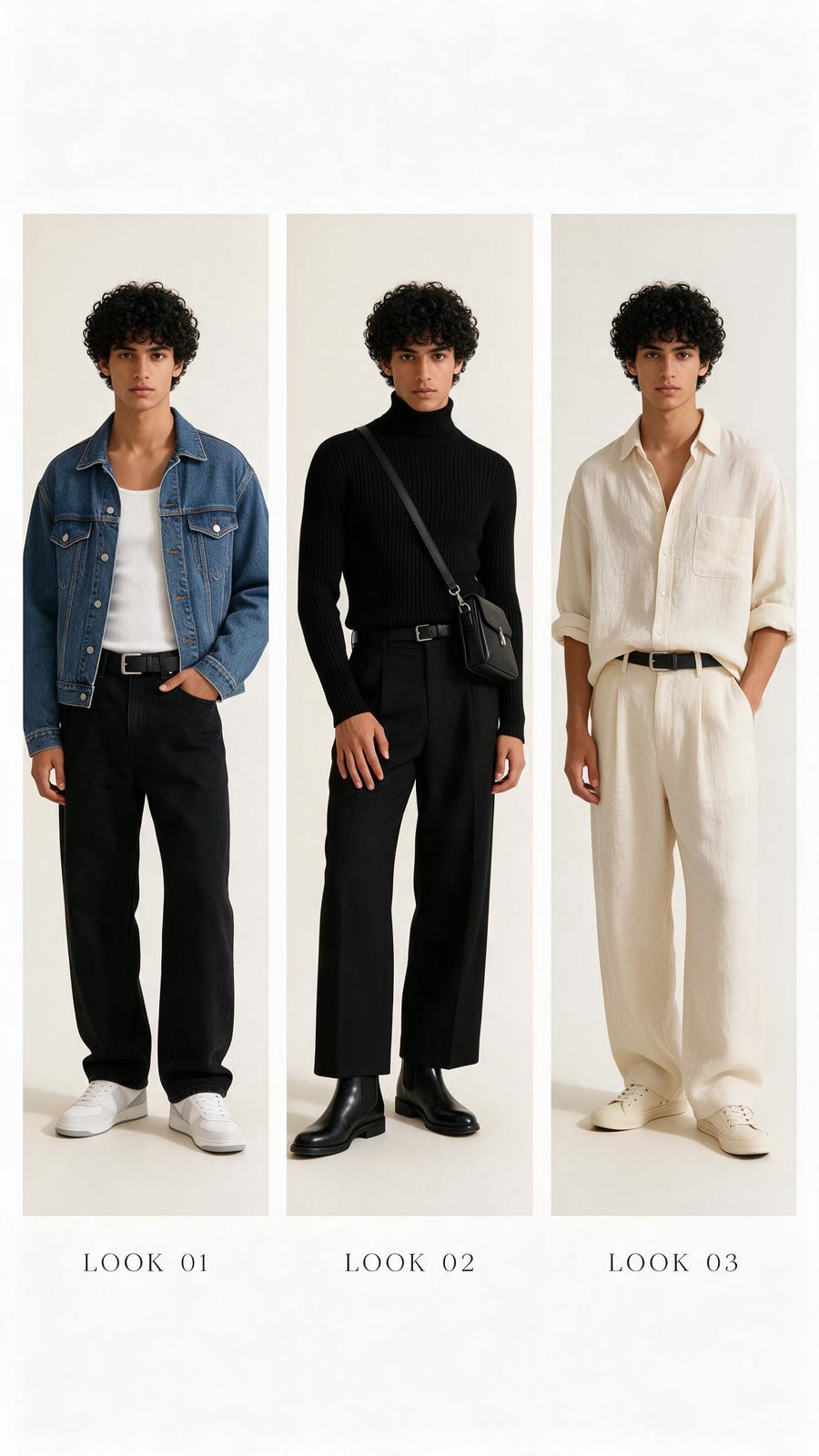 Same model, three looks
A fashion lookbook page with three vertical panels of the same model, a young man with curly black hair, wearing three outfits: a denim jacket, a black turtleneck, and a cream linen shirt. Same face in every panel, clean studio backdrop, small caption under each panel: "Look 01", "Look 02", "Look 03".
Start here
Most images
The newest Seedream, November 2026, with better composition and type than 5.0 Pro.
9 credits per image
Open with Seedream 5.5Option 2
Design and many languages
Layers, region edits and text in more than ten languages.
27 credits per image
Open with Seedream 5.0 ProOption 3
Fast drafts
The speed tier: Pro-style results quicker and for fewer credits.
6 credits per image
Open with Seedream 5.0 FlashOption 4
Large files
Web search before it draws and output up to 4K.
7 credits per image
Open with Seedream 5.0 Lite| Seedream 5.0 Pro | Seedream 5.5 | |
|---|---|---|
| Released | July 2026 | November 2026 |
| Strength | Multilingual text, layers, region edits | Composition, typography, long edit chains |
| Editing | Region selection and layers | Stable over many rounds of edits, per ByteDance |
| Largest output | About 4.6 megapixels | 2K |
Start on 5.5 for everyday images and edits. Keep 5.0 Pro for right-to-left text, layer splits and region edits.
Seedream 4.5 and 4.0 are also in Image Studio's model menu; see the Seedream family page. Credits are read from the live catalog; the Standard plan ($24/month) includes 2,000 credits, about 222 Seedream 5.5 images.
Write what you want in the box at the top of this page, or start from an example. Add a photo to edit it.
Your prompt and photo carry over with Seedream 5.5 picked. Nothing runs until you press Generate.
The credit price shows under the Generate button before anything is spent.
Try the same prompt on 5.0 Pro for other languages or on Flash for speed.
ByteDance's 2026 image line: Seedream 5.0 Lite, Flash and Pro, and Seedream 5.5. All of them generate from text and edit photos.
5.5 is the newest and the everyday pick. 5.0 Pro keeps the strongest multilingual text, layer splits and region edits.
Yes. 5.0 Pro is built for text in more than ten languages, including right-to-left scripts; our Arabic menu board came out right.
5.0 Lite does. 5.0 Pro, Flash and 5.5 stop near 4.6 megapixels; Seedream 4.5 is the other 4K option.
No. Every image costs credits, shown before you generate. Credits come with a monthly plan and unused credits roll over up to the plan's cap.
Yes, on paid Affogato plans, subject to our terms of service and the model provider's terms (ByteDance). You need the rights to anything you upload, such as photos, faces, voices or brand assets. Read our terms of service.
Facts checked November 22, 2026. Sources: fal: Seedream 5.0 Pro · fal: Seedream 5.0 Flash · AlternativeTo: Seedream 5.0 Pro launch · Atlas Cloud: Seedream 5.0 Flash vs Pro · Let's Data Science: Seedream 5.5 · Runware: Seedream prompting