Text in other languages
Black Forest Labs built FLUX.3 for multilingual text. Our Berlin bakery window came back with BÄCKEREI MÜLLER and its umlauts spelled right.
FLUX.3 · by Black Forest Labs
FLUX.3 is Black Forest Labs' 2026 model, built to make images and video in one family. FLUX.3 Image is the strongest FLUX for stills, with multilingual text and several local edits in one request; Klein is its fast tier; FLUX.3 video makes 5 to 20 second clips with sound. Describe an image below, or add a photo to edit, and it opens in Image Studio on FLUX.3 Image.

Example image
Opens in Image Studio with the model you picked. You see the price in credits before anything runs.
Black Forest Labs built FLUX.3 for multilingual text. Our Berlin bakery window came back with BÄCKEREI MÜLLER and its umlauts spelled right.
Ask for a list of changes and the rest stays put. We asked for three: the daisy and the removed passer-by landed; the overalls stayed blue.
The same model line makes 5 to 20 second clips with sound, including cheaper 720p drafts to check an idea first.
On Artificial Analysis' text-to-image arena FLUX 3 Image is the highest-ranked Black Forest Labs model, ahead of every FLUX.2 tier.
Every image below was generated with the prompt shown, unedited (an edit shows its original in the corner). Load any prompt into the generator and make your own version.
German text on glassCandid vertical photo of a baker in her fifties with rosy cheeks and a white headscarf, laughing in the doorway of her small Berlin bakery at dawn. The painted window behind her reads "BÄCKEREI MÜLLER" and below it "Frische Brötchen ab 6 Uhr". Warm light from inside, cold blue street, natural skin texture.
Vertical phone-style video: a street musician in her twenties with a shaved undercut sings into a small handheld mic beside an underground train platform, strumming a ukulele, smiling at passers-by. She sings: "Ten more minutes, then I'm home." Train arrives in the background, warm platform light. No on-screen text or subtitles.
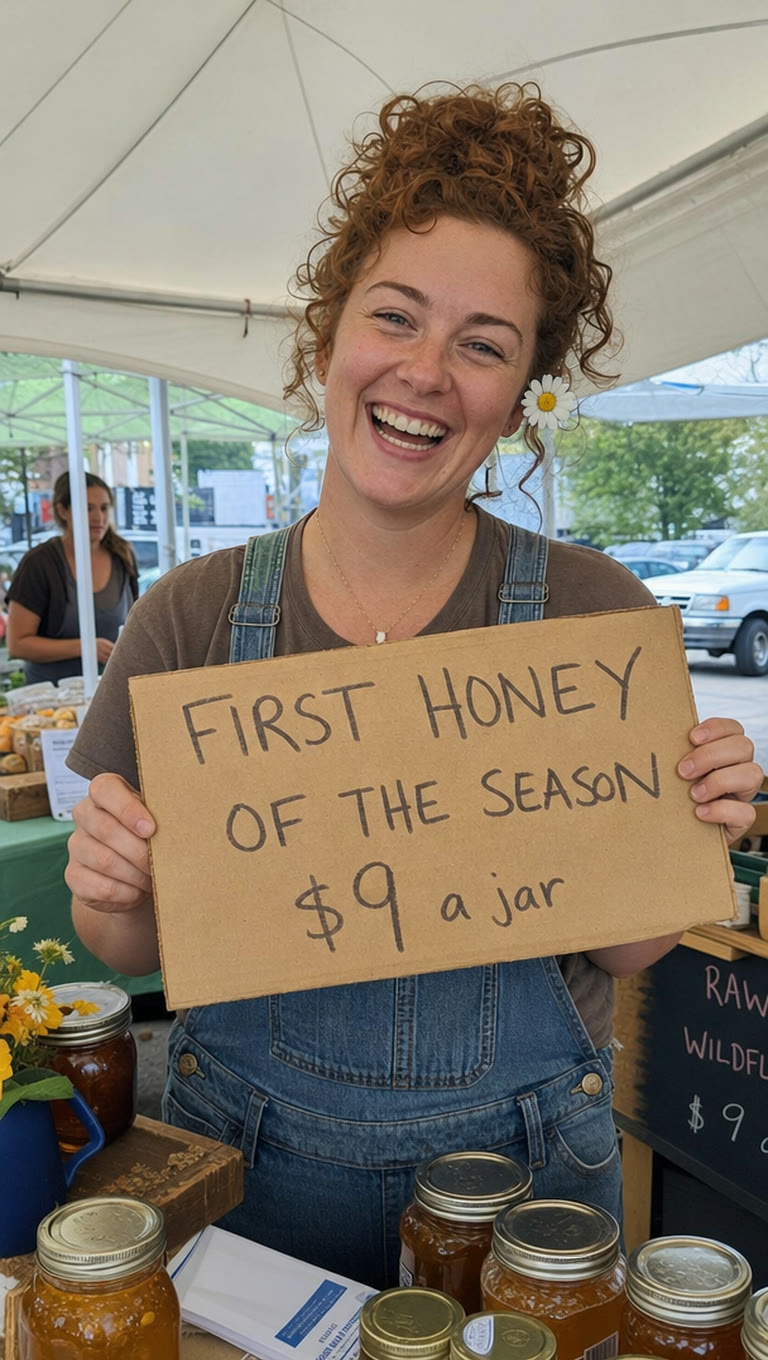 Several edits at once
 Original (AI)
Make three changes and leave everything else exactly as it is: change her overalls from denim blue to forest green, add a small white daisy tucked behind her left ear, and remove the man in the cap in the background. Keep her face, smile, hair, the sign and its words, the jars and the light unchanged.
 Fashion on a person
Vertical street-style fashion photo: a woman in her late twenties with a cropped platinum bob walks toward the camera across a zebra crossing in Seoul, wearing an oversized camel trench coat over a black turtleneck, wide charcoal trousers and white leather sneakers, a small burgundy shoulder bag. Mid-stride, one hand in her pocket, looking just past the lens. Overcast midday light, shallow depth of field, blurred taxis and pedestrians behind her. Shot on a 50mm lens, natural skin texture, editorial magazine look.
Vertical handheld video of a chef in his thirties with tattooed forearms flipping vegetables in a flaming wok in a busy restaurant kitchen, he glances at the camera and grins, sizzling sound, steam and orange flame light, natural motion. No on-screen text or subtitles.
 The fast tier
Vertical mirror selfie of a man in his twenties with a curly mullet and a thin moustache in a vintage shop changing room, trying on a brown suede jacket, phone in hand, warm tungsten light, natural skin texture, real photograph.
 Text in the image
A vertical magazine cover. Masthead at the top in tall white serif capitals: "NORTHBOUND". Below it, a young Black man with short twists in a rust-colored corduroy jacket stands on a windy coastal cliff, looking into the camera with a calm half-smile. Cover lines on the left in clean sans-serif: "The Slow Travel Issue", "48 hours in the Faroe Islands", "Why we stopped flying". Bottom right a small issue label: "No. 12 · Winter 2026". Natural overcast light, sharp print-quality photograph.
 Hands
Square close-up: an older couple's hands, both in their eighties, holding each other on a white tablecloth at their grandchild's wedding. Thin wrinkled skin, visible veins, her pearl ring and his worn gold band, a sprig of eucalyptus beside them, a blurred champagne glass in the background. Soft window light, film photography look, true anatomy, five fingers on each hand.
Start here
The best FLUX stills
Generates and edits; Image Studio opens on it.
10 credits per image
Open with FLUX.3 ImageOption 2
Fast drafts and volume
The open-weights tier, a fraction of the price; short, bold text only.
2 credits per image
Open with FLUX.3 KleinOption 3
Clips with sound
5 to 20 seconds from a prompt; image-to-video, extend and edit rows sit beside it in Video Studio.
5 s clip 155 credits · 5–20 s
Open with FLUX.3 Text to Video| FLUX.2 | FLUX.3 | |
|---|---|---|
| Released | November 2025 | October 2026 (Image) |
| Media | Images | Images and video |
| Edits | Reference images | Reference images plus several local changes at once |
| Layout control | JSON prompts | Bounding boxes in the prompt |
| Seed | Yes | No |
FLUX.3 is the one to start with. FLUX.2 still suits JSON prompts and repeatable results with a seed.
FLUX.3 Max video, FLUX.2 and FLUX.1 Kontext are also on Affogato; see the FLUX family page. Credits are read from the live catalog; the Standard plan ($24/month) includes 2,000 credits, about 200 FLUX.3 Image images.
Write what you want in the box at the top of this page, or start from an example. Add a photo to edit it.
Your prompt and photo carry over with FLUX.3 Image picked. Nothing runs until you press Generate.
The credit price shows under the Generate button before anything is spent.
Send the still to Video Studio and pick FLUX.3 Image to Video, or start a draft first.
Black Forest Labs' 2026 model family for images and video. FLUX.3 Image and Klein make stills; FLUX.3 video makes clips with sound.
For most images, yes: FLUX 3 Image ranks above every FLUX.2 tier on Artificial Analysis' arena and edits more precisely. FLUX.2 keeps a seed and documented JSON prompts.
Yes. On Affogato FLUX.3 video turns text, a photo, or a first and last frame into 5 to 20 second clips with sound, and can extend or edit a clip.
The fast, low-cost FLUX.3 image tier with open weights. Good for drafts; small text is not reliable.
No. Every image or clip costs credits, shown before you generate. Credits come with a monthly plan and unused credits roll over up to the plan's cap.
Yes, on paid Affogato plans, subject to our terms of service and the model provider's terms (Black Forest Labs). You need the rights to anything you upload, such as photos, faces, voices or brand assets. Read our terms of service.
Facts checked November 22, 2026. Sources: Black Forest Labs: FLUX 3 · Black Forest Labs: FLUX 3 Image Klein · Black Forest Labs: FLUX 3 Image overview · Black Forest Labs: prompting basics · The Decoder: FLUX 3 Image · Artificial Analysis: text-to-image arena · fal: how to use FLUX 3 video