Image studio · Restore
AI photo restoration
Scan or photograph an old print and ask for it to be repaired. The edit model removes creases, cracks, tears, dust and stains, rebuilds missing corners, corrects faded color, and can colorize a black and white photo, while keeping every face as it was.
Repair it, then color it
- Scan or photograph the print, flat and in even light.
- Ask for the repair, and say whether to colorize.
- Compare faces with the original, then download.
Sign in to run it. The price shows first.
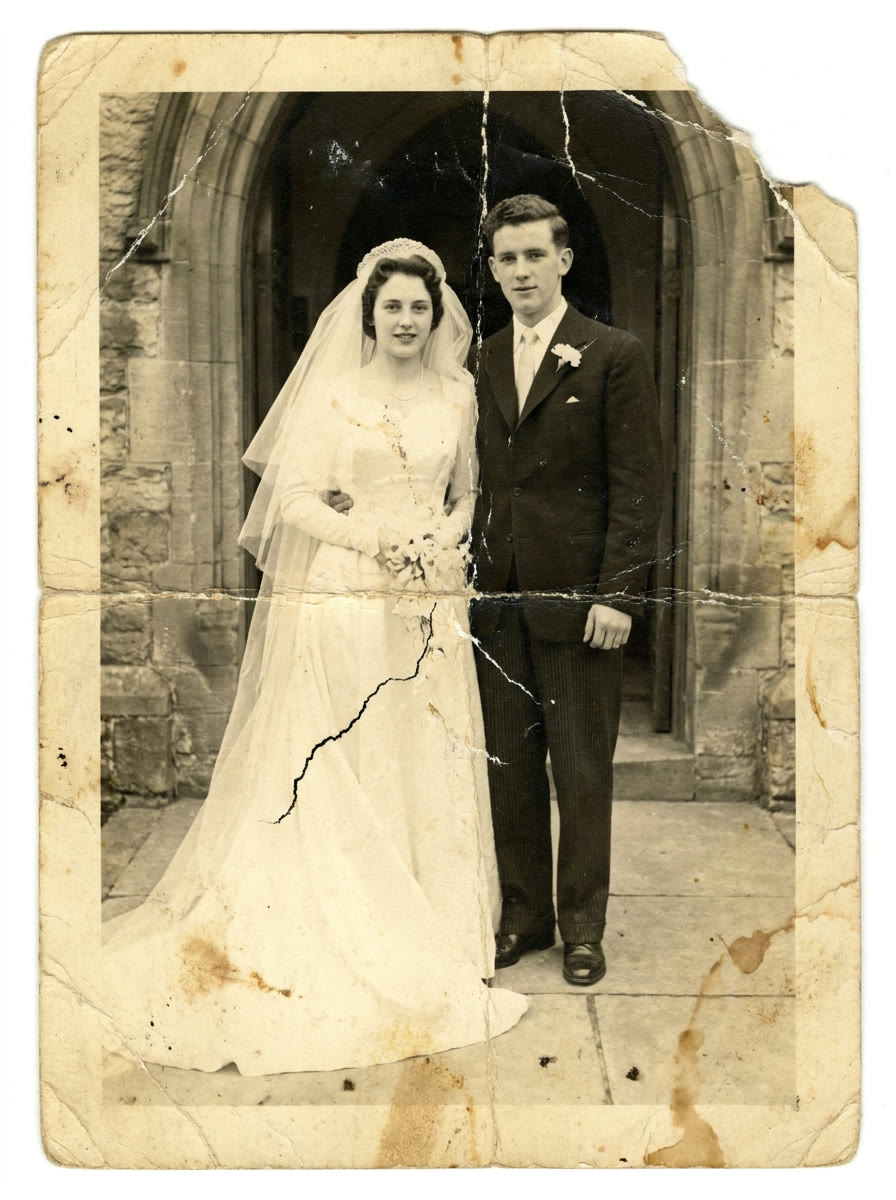

A cracked wedding print, repaired and colorized
01 Damaged print
Damaged black and white wedding photo with creases, a torn corner, cracks and stains
02 Restored
The wedding photo restored and colorized: clean, sharp, the couple and church door intact
03 What changed
Nano Banana Pro Edit removed the creases, the crack across the dress, the stains and the torn corner, then colorized it. The couple's faces, pose and the church door are kept.
Unedited output.
The damaged prints on this page are AI-generated stand-ins, so we don't publish anyone's family photos. Each restoration is one unedited run.
How do you restore an old photo with AI?
Scan the print, or photograph it flat in daylight without glare. Upload it to Image Studio's Edit tab with Nano Banana Pro Edit and ask: "Restore this damaged old photograph: remove every crease, tear, scratch, stain and dust spot, rebuild the missing corner, recover detail. Keep the faces, expressions, clothing and composition exactly as they are."
Add "and colorize it with natural, period-accurate colors" for color, or "keep it black and white" to only repair it. Run both and keep the one you like.
Restore this damaged old photograph: remove every crease, crack, tear, scratch, stain and dust spot, rebuild any missing corner, recover sharp detail, and colorize it with natural, period-accurate colors. Keep every face, identity, expression, pose, clothing and the composition exactly as they are.
Restore this damaged old black-and-white photograph and keep it black and white: remove the creases, scratches, spots and silvering, fill in missing areas, restore tonal range and detail. Keep every face, identity, expression and the composition exactly as they are.
What it does
- Physical damage
- Creases, cracks, tears, scratches, dust, water stains and missing corners.
- Faded color
- Magenta and orange casts from old color prints corrected to natural color.
- Colorize or not
- Add natural color to black and white photos, or repair them and keep them monochrome.
- Faces kept
- The prompt asks for every face, expression and pose to stay, and our examples did.
Faded, cracked, black and white
Three kinds of damage, each fixed in one run with the prompts above.
 Faded
 Restored
A 1970s snapshot with a magenta cast
 Damaged
 Repaired, B&W
 Colorized
A creased 1940s portrait: repaired, then colorized
How to restore an old photo with AI
- 01
Digitize the print
Scan it at 600 dpi or more, or photograph it flat, in daylight, straight on, without glare.
Photo in a frame behind glass? Take it out; reflections get "restored" too.
- 02
Ask for the repair
In Image Studio's Edit tab with Nano Banana Pro Edit, paste a restore prompt and say whether to colorize.
Only want the color fixed? Ask for the color cast to be corrected and nothing else.
- 03
Check faces, then upscale
Compare every face with the original. Then send the result to Upscale for printing.
A face drifted? Run it again, or crop to the person and restore that crop.
Models for restoration
Our examples use Nano Banana Pro Edit. For print, finish with an upscaler.
| Model | Best at | Credits |
|---|---|---|
| Nano Banana Pro Edit | Repairing damage and colorizing, faces kept | 30 per image |
| Seedream 5.0 Pro Edit | Fixing one damaged area and leaving the rest | 27 per image |
| GPT Image 2.6 Flare Edit | Following long, detailed instructions | 76 per image |
| Topaz Generative Upscale | Afterwards: 2× for printing | 32 per clip |
Where it's used
Tips
- Scan, don't snap, when you can: 600 dpi or more.
- Remove the print from glass to avoid reflections.
- Run "keep it black and white" and "colorize" and compare.
- Check every face against the original before printing.
Is AI photo restoration faithful to the original?
It repairs damage by predicting what was under it. For cracks, dust and fading that prediction is very reliable. Where part of a face is missing, or for colorization, the model has to invent detail, so the result is a careful reconstruction rather than a recovered fact.
Keep the original scan alongside the restoration, and check each face against it. If a likeness drifts, crop to that person and restore the crop on its own.
FAQ
Can it colorize black and white photos?
Yes. Add "colorize it with natural, period-accurate colors" to the prompt. Colors are the model's best guess; describe known colors (a blue dress, red hair) to steer it.
Will it keep the faces the same?
The prompt asks it to, and in our examples it did. Where part of a face is torn away, it has to reconstruct it, so compare with the original.
What damage can it fix?
Creases, cracks, tears, missing corners, scratches, dust, water stains, silvering and faded or tinted color.
How much does it cost?
Nano Banana Pro Edit is 30 credits per image. The Standard plan is $24 a month for 2,000 credits. The price shows before you run it.


