How to Choose Fashion Photography Poses That Show the Clothes
Build three women’s fashion looks with expressive poses, real clothing references, and distinct lighting using Affogato Realism.
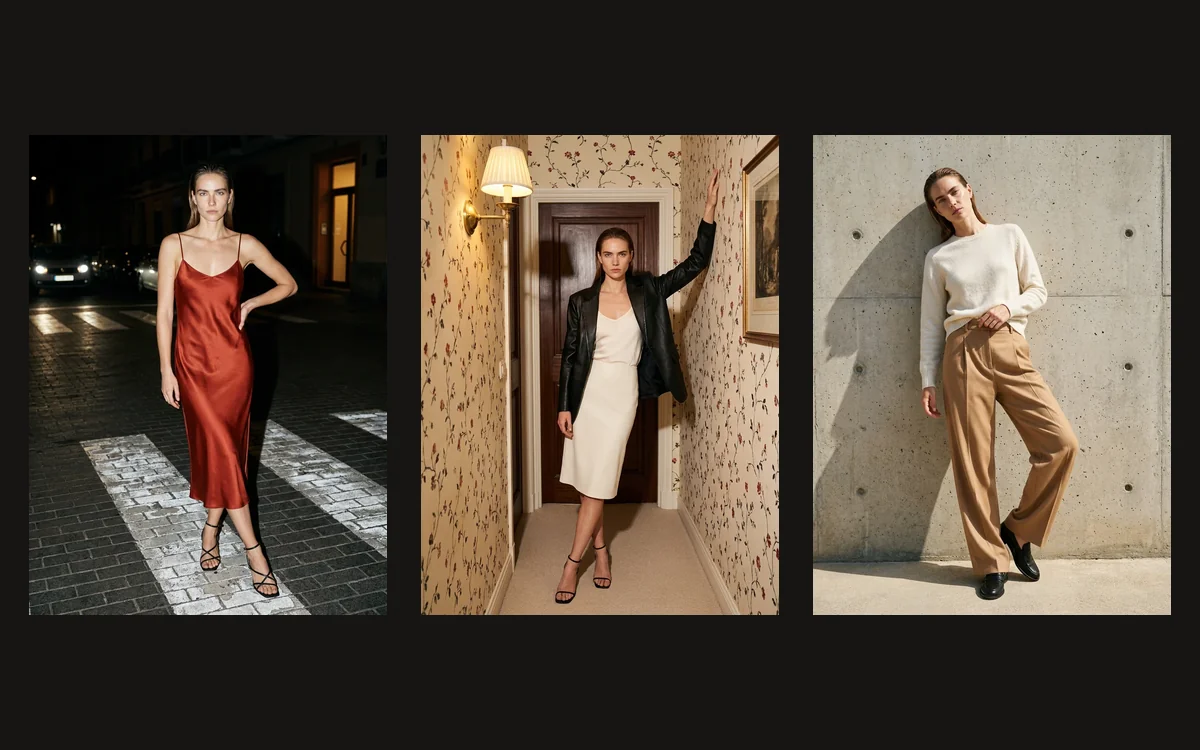
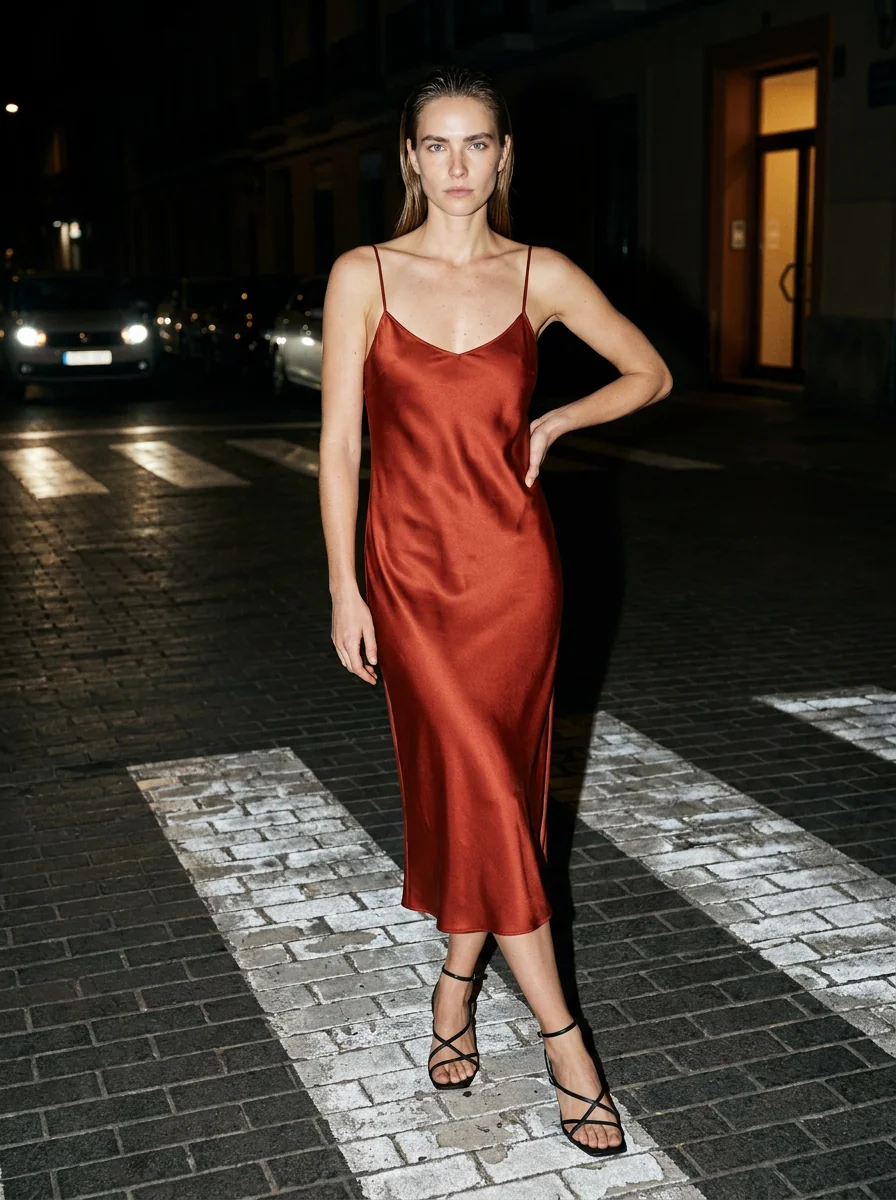
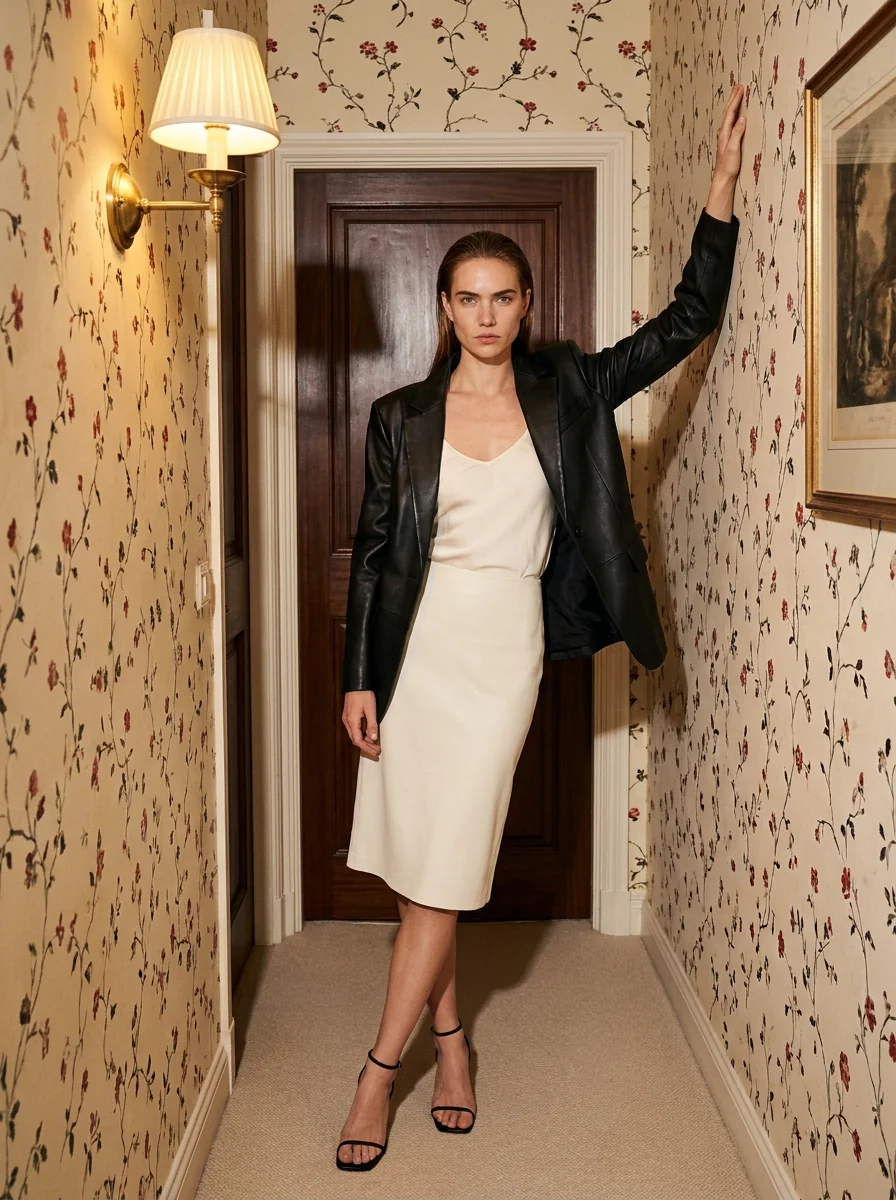
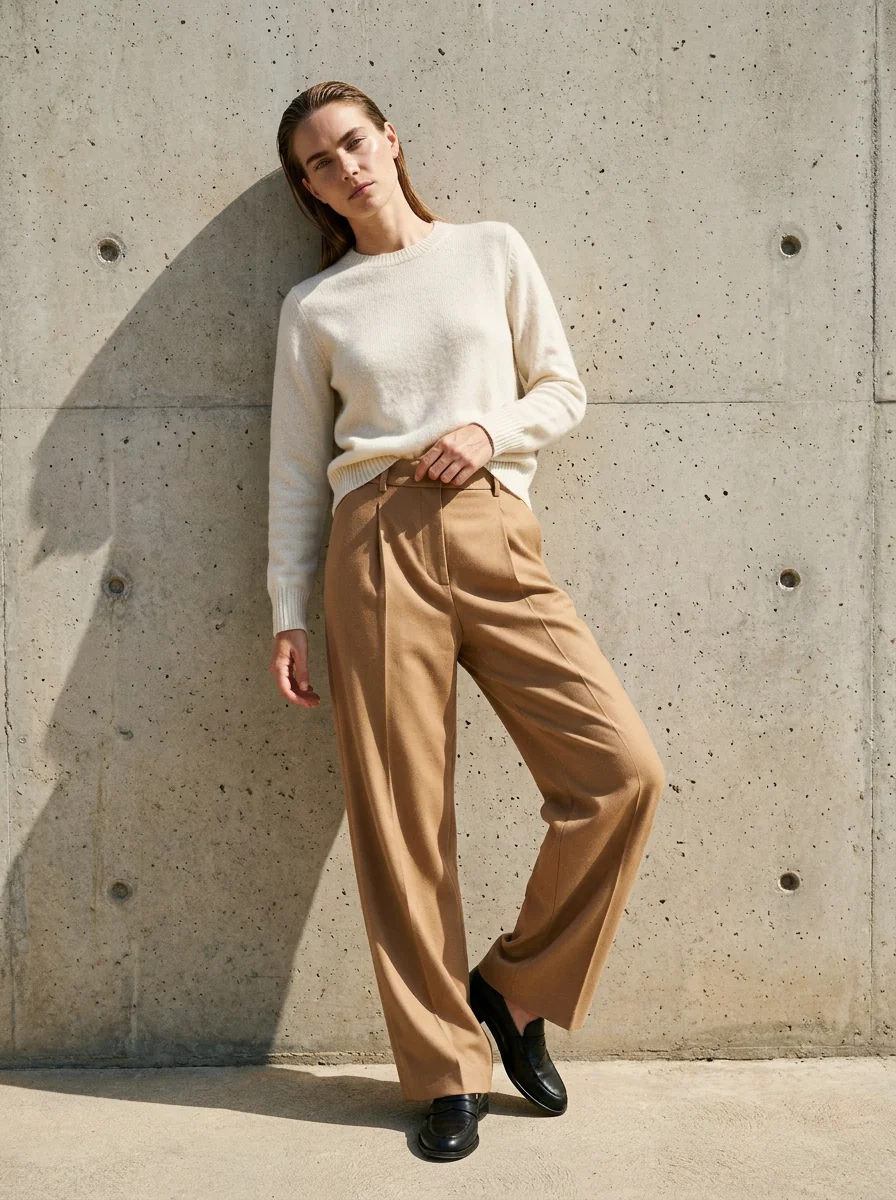
Build a fashion photograph around the outfit, pose and light together. These three looks use standard female character Astrid and women’s references from the Visual Inspiration Gallery: red silk under night flash, black leather in a warm hallway, and ivory cashmere in hard daylight. All three were generated with Affogato Realism.
The presenter is a standard Affogato fictional character. The saved character supplies identity; the Gallery references supply the photographic direction.
Choose the outfit and lighting before the pose
Start with a garment detail you want the photograph to explain. A silk dress needs space for its bias-cut skirt and highlights along the folds. A leather blazer benefits from a clear lapel and a gesture that gives the shoulder shape. A cashmere sweater needs enough directional light for its fine texture and ribbing to be visible.
Choose a women’s fashion reference that already contains the body language and photographic treatment you want. Open it in the Visual Inspiration Gallery and inspect its Image prompt. Look at where the woman puts her weight, what supports her hands, the camera height and the direction of the light. Those specific decisions are more useful than a request for “a beautiful fashion shot.”
Keep the face consistent while changing the look. Here, Astrid comes from the standard character library. The Gallery supplies the setting, pose and light; real Quince product photographs establish the red silk dress, black leather blazer and ivory cashmere sweater. Review the retailer photographs before writing the garment details into each prompt.
Use direct flash and a crossed stance for silk
The first look starts with a women’s night-crossing reference. White road stripes run beneath the figure, a vehicle’s headlights glow behind her, and direct flash separates her from the dark street. That bright subject against a nearly black background gives a red satin dress a clear visual role.
The clothing source is Quince’s 100% Washable Silk Slip Dress in Paprika Red. Describe the thin straps, shallow V neckline, bias-cut midi shape and simple hem. Leave out the character’s original top and necklaces. The prompt needs to replace the complete outfit rather than keep an old jacket and change the background around it.
Put the weight on the back leg, bring one foot forward and relax the knees into a slightly crossed stance. Keep one hand near the hip and the other clear of the skirt. A small head tilt gives the pose attitude while the viewer can still follow the dress from neckline to hem.
Ask for direct frontal flash, fast falloff into the street and a visible highlight along the satin folds. Review the returned dress for extra slits or straps and check that the flash has survived the generation. Soft daylight would produce a different photograph, even with the same pose and outfit.
Give leather shape with a raised-arm pose
The second reference shows a woman with one arm raised against the wall of a narrow patterned hallway. The dark wooden door, red floral wallpaper and brass sconce make the setting feel specific. Use that supported gesture to give the upper body a stronger line.
For this look, describe Quince’s women’s 100% Leather Blazer in Black: notched lapels, two front buttons, lower patch pockets, straight sleeves and a hip-length hem. Style it open over an ivory camisole and a simple ivory skirt. The change from red silk to black leather gives the pose another job: reveal the shoulder folds and lapel rather than the flow of a skirt.
Place the raised palm on the wall above the head, let the other arm hang naturally and cross the ankles. The wrist should meet the wall convincingly. Leave a lapel and pocket visible so the dramatic gesture still tells the reader something about the garment.
Use warm light around the sconce with a restrained frontal flash and deep shadows at the door. Describe the little highlights along the black leather instead of asking for uniformly bright skin and clothing. Check that the room retains its patterned walls and warm light; those are part of the chosen direction.
Use hard daylight to reveal knit texture
The third women’s reference uses a rough concrete wall, a tilted head and one bent knee. Hard sunlight produces a clear shadow on the wall. This gives a quieter outfit shape without relying on another interior or another flash-lit street.
The garment is Quince’s Mongolian Cashmere Crewneck Sweater in Ivory. Describe its close round neckline, fine-gauge body, long sleeves and ribbed cuffs and hem. Pair it with simple camel pleated trousers and black loafers. Keep the neckline intact instead of inheriting the character’s original off-shoulder top.
Let the upper back rest lightly against the wall. Put the weight on one leg, bend the other knee and keep one hand near the waistband. A slight tuck at the front can show the trousers while leaving the sweater’s side hem and sleeve folds visible. The pose should have a believable support rather than look suspended beside the wall.
Ask for hard sunlight and a distinct cast shadow so the knit and its folds remain readable. In the returned example, the wall shadow falls to the left of the figure. Use that visible direction when planning the next photograph. Check that the face remains Astrid and that the model has not added the trench coat, denim shirt or handbag from the original Gallery outfit.
Generate each look with Affogato Realism
Open Image Studio, choose Generate, select Affogato Realism and add Astrid from the standard character library. Choose a portrait aspect ratio, then adapt the selected Gallery Image prompt with the outfit and body position you want. The copyable prompts beside these examples contain the actual direction submitted for each look.
In this workflow, the Gallery photograph and retailer product photograph were inspected to write the prompt. We kept the studio on Affogato Realism with the character selected. Adding scene or clothing photo references in the current Generate interface switches it to a compatible editing model, so those photos were not attached to these Realism requests.
Review the whole image before choosing it for the set. Compare the face, garment silhouette, neckline, closures, hands, feet and supporting surface. Then compare the lighting with the Gallery direction. Correct the sentence responsible for a lost detail rather than adding another long string of vague quality adjectives.
Save the three approved photographs with their prompts, garment links and Gallery choices. Each photograph should add a different useful view. If you later animate one, start with a movement its pose already suggests, such as a small weight shift or head turn, and inspect the garment throughout the returned clip.
Product and photographic sources:
Quince silk slip dress — Paprika Red · Quince women’s leather blazer — Black · Quince cashmere crewneck — Ivory ·Gallery source for Silk · night flash: @shayericksen
Gallery source for Leather · warm hallway: @chantalmonaghan
Gallery source for Cashmere · hard daylight: @jimmychoo
To develop a complete fashion shoot, explore Affogato Studios. For individual creation tools, browse Affogato Tools.