Seedance 2.5 Prompts: 4 Examples for Videos With Real People
Copy four Seedance 2.5 prompts and watch the finished videos. Learn how to keep a person recognizable across new scenes in Affogato.
The most useful Seedance 2.5 prompts give a person one clear thing to do. A head turn, a spoonful of dessert or a glance toward the camera can make a six-second video feel complete.
Below are four finished videos made in Affogato, with the exact prompt used for each. They follow the same copper-haired woman from a beach to a mountain lake, a busy street and a close-up outdoors. Start with the example closest to your idea, then change the setting or action.
Affogato supports photos of real people in its Seedance 2.5 workflow. If another platform blocks your face upload, you can use a photo you have permission to use in Affogato instead. The examples here use a fictional character; the same workflow lets you build scenes around your own permitted person photos.
Set up the person, scene and action
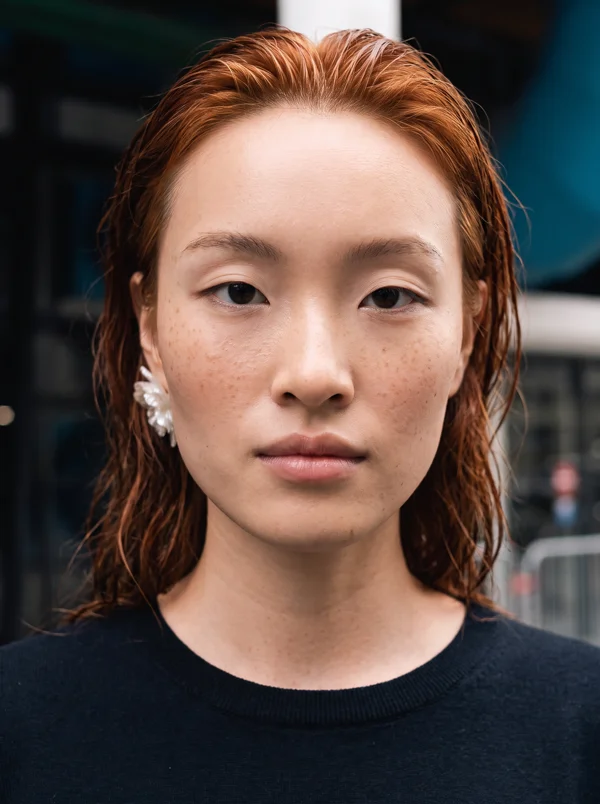
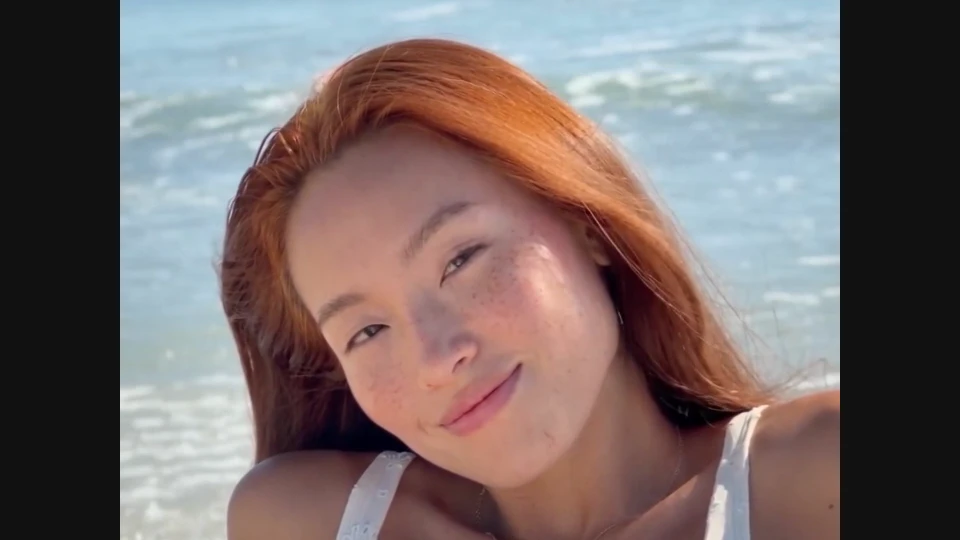
This is the character photo used for all four videos. Her face establishes who appears; each scene gives her something different to do.
Open Video Studio, choose the Reference workflow and select Seedance 2.5. These examples used both a person photo and a short scene video. In the prompts, #Image1 means the person photo and #Video1 means the scene clip. Upload your own corresponding files before using those labels.
The finished clips were generated with the settings below. The photo was used for identity, rather than as an opening frame to animate. The scene clip supplied the setting, outfit and movement. Copying the text alone will not reproduce the same result without those inputs.
A practical prompt structure is person → scene and outfit → action → framing → duration. State what should stay recognizable, then describe a movement that fits into the clip. For the upload steps, follow our Seedance 2.5 web tutorial.
1. Beach portrait: a head tilt and a smile
A small expression works well when the face is the focus. Here, the woman sits beside the surf, tilts her head toward the camera and smiles. The beach supplies movement in the background without requiring her to walk, change pose and interact with several objects.
Create a fresh six-second video starring the fictional adult woman in #Image1. Use this photo only for identity: preserve her face, freckles, almond-shaped eyes and copper-red hair. Use #Video1 for the scene, outfit, composition and movement, replacing its principal woman with the woman from #Image1. Do not animate the identity portrait or use it as a starting frame. Keep other changes minimal. Use the upright beach portrait portion. She wears the white embroidered top and pale trousers beside the surf. She tilts her head gently toward the camera and gives a small smile. Keep her face and complete head visible. One continuous shot. No spoken dialogue, text, logos or overlays.
Scene inspiration: @_thecurrentstudio. The video above is our generated result.
What to borrow: ask for one continuous shot and keep the complete head visible. If you want a different expression, replace the smile instruction while keeping the rest of the action simple.
2. Mountain lake: turn from the view to the camera
This prompt gives the shot a clear progression: look across the lake, turn, then make eye contact. The gray sweater and mountain setting distinguish it from the beach clip while the same person remains the focus.
Create a fresh six-second video starring the fictional adult woman in #Image1. Use this photo only for identity: preserve her face, freckles, almond-shaped eyes and copper-red hair. Use #Video1 for the scene, outfit, composition and movement, replacing its principal woman with the woman from #Image1. Do not animate the identity portrait or use it as a starting frame. Keep other changes minimal. Use the mountain-lake setting and gray sweater. She stands beside the water, looks out across the lake, then turns toward the camera. Leave her face unobstructed and her copper hair visible. One continuous shot; do not include the waterfall or other people from the montage. No spoken dialogue, text, logos or overlays.
Scene inspiration: @dakotas.paige. The video above is our generated result.
What to borrow: specify which part of a scene you want to keep. The source clip contained several travel moments; the prompt singled out the lake and excluded the waterfall and other people. That makes the intended result easier to describe and assess.
3. Lemon dessert: one small action with a prop
Holding a dessert gives the person a reason to move. The sequence stays short: take one spoonful, lower the spoon and smile. Asking her to order, pay, walk away and eat would put too many actions into the same six seconds.
Create a fresh six-second video starring the fictional adult woman in #Image1. Use this photo only for identity: preserve her face, freckles, almond-shaped eyes and copper-red hair. Use #Video1 for the scene, outfit, composition and movement, replacing its principal woman with the woman from #Image1. Do not animate the identity portrait or use it as a starting frame. Keep other changes minimal. She wears the colorful beaded top and white skirt on the pedestrian street. She holds the lemon dessert, takes one small spoonful, lowers the spoon and smiles toward the camera. Keep her face clearly visible. One continuous shot. No spoken dialogue, text, logos or overlays.
Scene inspiration: @ritafaez. The video above is our generated result.
What to borrow: describe the order of the hand movements. Watch the spoon, fingers and dessert as closely as the face. An appealing expression is only part of a usable shot when the person handles an object.
4. Outdoor close-up: a blink and a glance
For a close portrait, there is no need to invent a complicated performance. This example asks for a natural blink and a slight glance aside. The hoodie and braids change the styling while the face stays large enough to judge.
Create a fresh six-second video starring the fictional adult woman in #Image1. Use this photo only for identity: preserve her face, freckles, almond-shaped eyes and copper-red hair. Use #Video1 for the scene, outfit, composition and movement, replacing its principal woman with the woman from #Image1. Do not animate the identity portrait or use it as a starting frame. Keep other changes minimal. She wears the pale zip-front hoodie outdoors beneath the blue sky. Keep her copper hair recognizable, gathered into two loose braids. In a close portrait she looks toward the camera, blinks naturally and glances slightly aside. Keep stray hair clear of her eyes. One continuous shot. No spoken dialogue, text, logos or overlays.
Scene inspiration: @elizasail. The video above is our generated result.
What to borrow: keep the requested movement modest when the camera is close. This result still has loose strands crossing the face, despite the instruction to keep hair clear. Treat the prompt as a direction to review, rather than a guarantee that every detail will be followed.
Refine the result without rewriting everything
Play the entire video before deciding to use it. Compare the face with the original photo at the beginning, middle and end. Check the eyes, nose and mouth shape as well as the hairstyle. Copper hair alone does not establish a consistent identity, and fine details such as freckles can soften in generated video.
If the face drifts, simplify the movement or use a clearer person photo. If a hand or prop changes shape, reduce the interaction. If the scene switches unexpectedly, ask for one continuous shot and remove competing events. Change one instruction at a time so you can judge whether it helped.
Save the prompt and settings with every result you keep. For an automated workflow that submits a job, finds the completed video and downloads it, see our Seedance 2.5 API tutorial. To try your first example in the browser, start with one person and one short action.